Let’s be honest. If you are a developer, you have experienced “integration hell.”
Picture this: You’ve spent a week working on a brilliant new feature in your isolated branch. It works perfectly on your local machine. Friday afternoon rolls around, and it’s time to merge your work into the main development branch, where five other teammates have also been committing code.
You hit merge. Suddenly, your screen explodes in red text. Conflicts everywhere. Nothing compiles. The tests are failing. Your weekend plans just evaporated.
When I started my career in software development, this was practically a weekly ritual. We called it “The Big Bang Merge,” and it was terrifying.
Then, I discovered Continuous Integration (CI). It changed everything.
If you want to know how to continuous integration not just the textbook definition, but how to actually do it in the real world—this guide is for you.
What is CI in Software Development Anyway?
Before we dive into the “how,” we need to clarify the “what.”
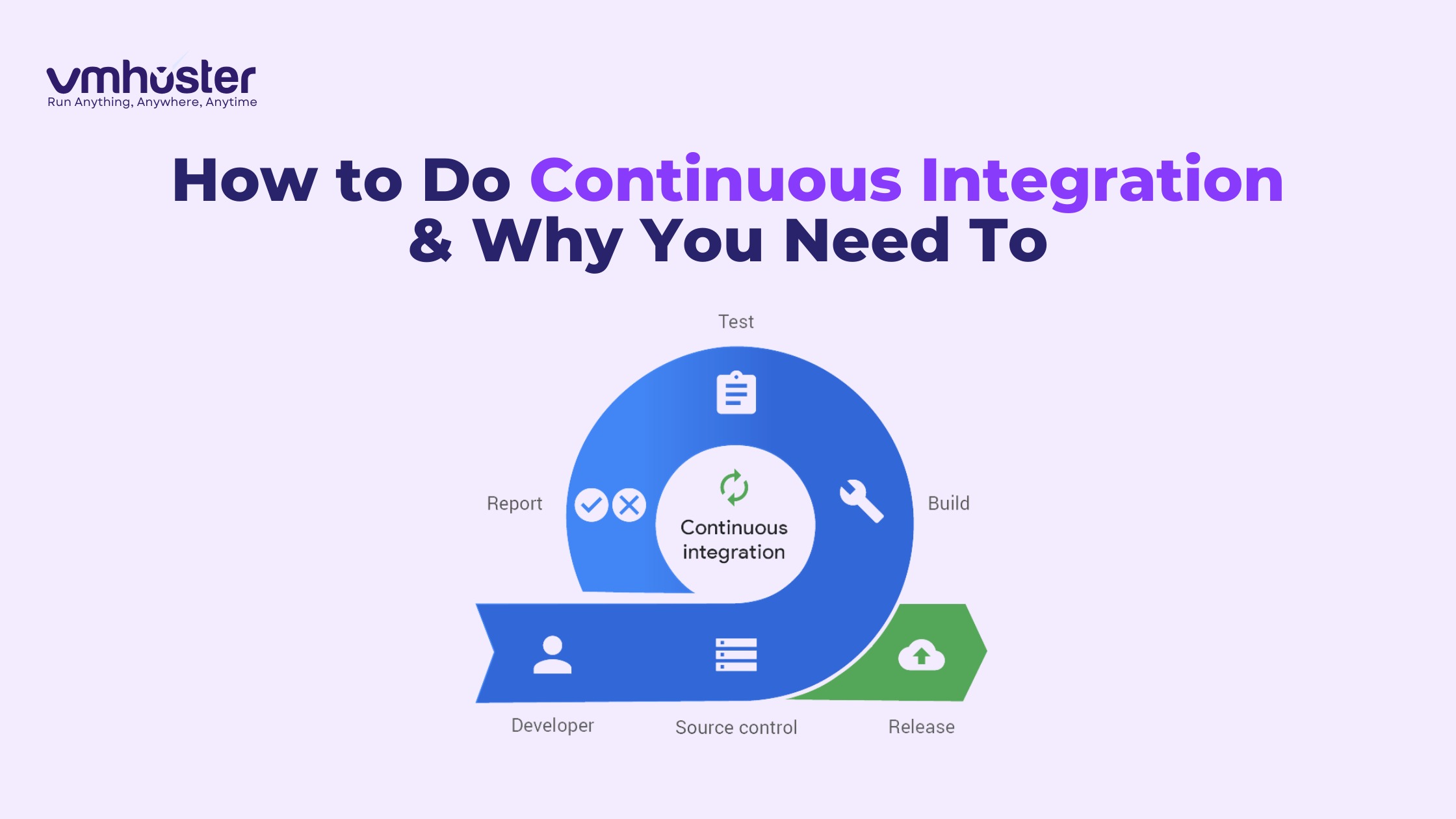
What is CI in software development? Continuous Integration is a development practice where developers integrate code into a shared repository frequently—preferably several times a day. Each integration is then verified by an automated build and automated tests.
Think of it like writing a book with co-authors. Instead of everyone writing five chapters alone and trying to mash them together at the end, everyone writes one paragraph, submits it to an editor who instantly checks for grammar and plot consistency, and adds it to the master manuscript immediately.
Agile and Continuous Integration
CI isn’t just a neat trick; it’s foundational to modern methodologies. You cannot truly do agile and continuous integration separately. Agile demands speed and adaptability. CI provides the technical safety net that allows you to move fast without breaking things constantly.
The Difference Between Continuous Integration and Continuous Delivery
These two terms are often thrown around together (CI/CD), but they are distinct steps.
- Continuous Integration (CI): The practice of merging all developer working copies to a shared mainline several times a day. Its main goal is to prevent integration problems (merge conflicts, broken builds).
- Continuous Delivery (CD): This picks up where CI leaves off. It ensures that the software can be released to production at any time.
In short: CI puts the code together and checks if it’s broken. CD ensures the code is ready to ship to the user.
The Mechanics: Under the Hood of a CI Pipeline
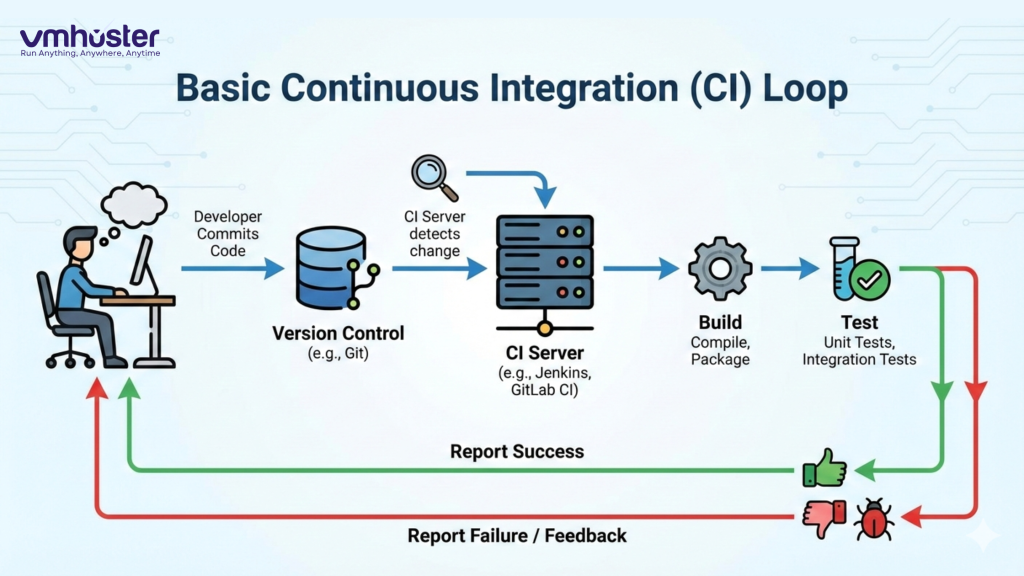
To understand how to implement CI, you need to know the components involved. It’s not magic; it’s just servers and scripts.
1. The Source Control Management (SCM)
This is where your code lives (e.g., Git, GitHub, GitLab, Bitbucket). The CI process is triggered whenever code is pushed here.
2. The Continuous Integration Server (The Brain)
So, what is a ci server? It acts as the traffic controller. It monitors your SCM system. When it sees a change, it wakes up and orchestrates the next steps. Popular examples include Jenkins, GitLab CI, CircleCI, and GitHub Actions.
Often, these servers require robust infrastructure to run efficiently.
(If you are setting up your own instance of Jenkins, you’ll need reliable infrastructure, such as a High-Performance VPS, to handle the load of concurrent builds.)
3. The Continuous Integration Agent (The Muscle)
Sometimes the CI server does the work itself, but in larger setups, it delegates tasks to a continuous integration agent. The agent is a separate machine (or container) that actually compiles the code and runs the tests. This frees up the main server to manage other jobs.
4. What is Continuous Build?
Once the CI server detects code, it initiates a “build.” What is continuous build? It’s the process of taking source code and converting it into a standalone artifact that can be run. Depending on your language, this might involve compiling, linking, or packaging files (like creating a Docker image or a JAR file). If the code doesn’t compile, the process stops right here.
The Heartbeat of CI: Automated Testing
If you are doing builds without tests, you aren’t doing Continuous Integration; you are just doing “Continuous Compilation.”
Test automation and continuous integration are inseparable. The entire point of CI is to gain confidence that the latest changes didn’t break existing functionality.
CI Test Strategy
Your ci tests should run every single time someone pushes code. Because this happens frequently, these tests must be fast.
- Unit Tests: The foundation. They test individual functions/classes in isolation. They should run in seconds.
- Integration Tests: Verify that different pieces of the application work together (e.g., does the API actually talk to the database database?).
- CI CD in Testing: In broader CI/CD pipelines, you might later add slower end-to-end tests (like Selenium), but for the immediate CI feedback loop, speed is king.
If you neglect test automation in continuous integration, your team will eventually ignore build failures because “it takes too long to run anyway,” defeating the whole purpose.
How to Continuous Integration: Step-by-Step Implementation
Okay, let’s get practical. How do you actually start doing this? Here are the essential continuous integration steps.
Phase 1: Cultural Shift (Commit Early, Commit Often)
Before installing any tools, change your behavior. Stop hoarding code on your local machine for days.
- Break features down into tiny tasks.
- Push code to the shared repository at least once a day.
- The Golden Rule: Never push code to the shared branch that is broken locally.
Phase 2: Version Control Everything
Everything needed to build your project must be in version control. Not just application code, but database schema migration scripts, infrastructure configuration, and build scripts.
Phase 3: Automate the Build
You need a single command that can build your system from scratch.
- If you are using Java, maybe it’s mvn clean install.
- If you are using Node.js, maybe it’s npm run build.
If a new developer joins your team, they should be able to check out the repository and run one command to get a working build. If they have to manually copy DLLs or configure obscure environment variables on their laptop, you aren’t ready for CI.
Phase 4: Automate the Tests
Similar to the build, you need a single command to run your ci tests. (e.g., npm test). These tests must be reliable. Flaky tests (tests that sometimes pass and sometimes fail without code changes) are the enemy of CI.
Phase 5: Set Up Your Continuous Integration Server
Now you choose your weapon. What is a continuous integration tool? It’s the software that manages this whole process.
- Choose a tool (e.g., Jenkins, GitHub Actions, GitLab CI).
- Configure it to listen to your code repository.
- Tell it which commands to run for the build and test phases.
Phase 6: The Feedback Loop (Fix it FAST)
This is the most critical phase. When the CI server reports a failure (usually via email, Slack, or a dashboard turned bright red), the team must treat it as an emergency.
The build is broken. Stop what you are doing. Fix the issue. Get the build green again. Do not add new code on top of a broken build.
Conclusion: Making CI a Habit
Learning how to continuous integration isn’t just about learning a tool like Jenkins. It’s about discipline. It’s about the peace of mind that comes from knowing that if the build is green, your software is likely in a healthy state.
It takes effort to set up continuous integration testing automation and configure the servers. But the investment pays off exponentially by banning “integration hell” from your life forever.
Start small. Automate your compile. Then add unit tests. Then add integration tests. Before you know it, you’ll be releasing better software, faster.