When I first migrated our company’s infrastructure to the cloud three years ago, I wasn’t entirely sure what to expect. The promises were big—cost savings, flexibility, and seamless scalability. But like any technology decision, cloud computing comes with its own set of trade-offs that every business owner or IT professional should understand before making the leap.
Cloud computing has revolutionized how businesses store data, run applications, and manage their IT infrastructure. According to Gartner, the worldwide public cloud services market is projected to grow significantly, with more organizations embracing cloud solutions than ever before. But is it the right choice for everyone? Let’s dive deep into both sides of the coin.
What Is Cloud Computing? A Quick Refresher
Before we explore the pros and cons, let’s quickly define what we’re talking about. Cloud computing means storing and accessing data and programs over the internet instead of your computer’s hard drive. Think of services like Google Drive, Dropbox, or Amazon Web Services (AWS)—these are all cloud-based platforms.
There are three main types:
- IaaS (Infrastructure as a Service): Like renting virtual servers
- PaaS (Platform as a Service): Development platforms in the cloud
- SaaS (Software as a Service): Ready-to-use applications like Gmail or Salesforce
The Advantages of Cloud Computing
1. Cost Efficiency That Actually Makes Sense
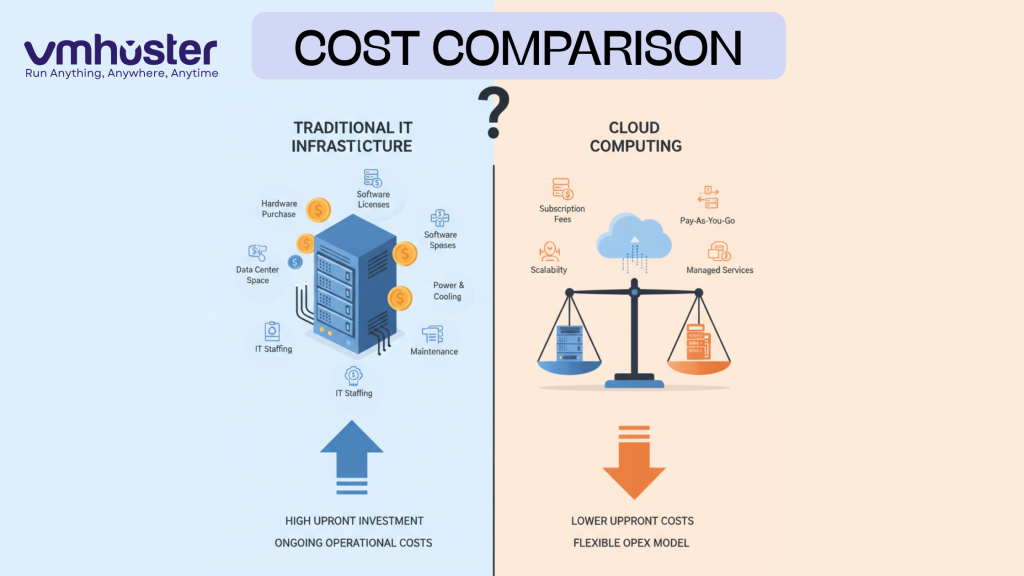
Let’s talk money first—because that’s usually what gets management’s attention. When you move to the cloud, you’re essentially switching from a capital expenditure (CapEx) model to an operational expenditure (OpEx) model.
What does this mean practically? Instead of spending $50,000 upfront on servers that might become obsolete in three years, you pay a predictable monthly fee. No more surprise hardware failures draining your budget. No more paying for an entire IT team to maintain physical servers.
I’ve seen small businesses save 30-40% on their IT costs within the first year of migration. You’re paying only for what you use—scale up during busy seasons, scale down when things are quiet.
2. Scalability and Flexibility on Demand
Remember the last time your website crashed because of unexpected traffic? With cloud computing, those nightmares become rare.
If you’re running an e-commerce site and suddenly get featured on a major news outlet, your cloud infrastructure can automatically scale to handle the increased load. When I worked with a retail client during Black Friday, their cloud setup seamlessly handled 10x their normal traffic without a single issue.
The beauty is that this works both ways—scale down during slower periods and reduce costs. It’s like having an elastic infrastructure that grows and shrinks with your needs.
3. Accessibility From Anywhere
The pandemic taught us one crucial lesson: remote work isn’t just a perk anymore; it’s a necessity. Cloud computing makes this possible.
Your team in New York, developers in India, and clients in London can all access the same files, applications, and tools in real-time. All you need is an internet connection. This level of accessibility has become absolutely essential for modern businesses. Learn more about remote access solutions and VPS hosting to enhance your team’s productivity.
4. Automatic Updates and Maintenance
Here’s something I genuinely appreciate—no more weekend maintenance windows. Cloud service providers handle all the backend updates, security patches, and hardware maintenance for you.
Your team can focus on core business activities instead of worrying about whether the servers need updating or if you’re running the latest security patches.
5. Disaster Recovery and Business Continuity
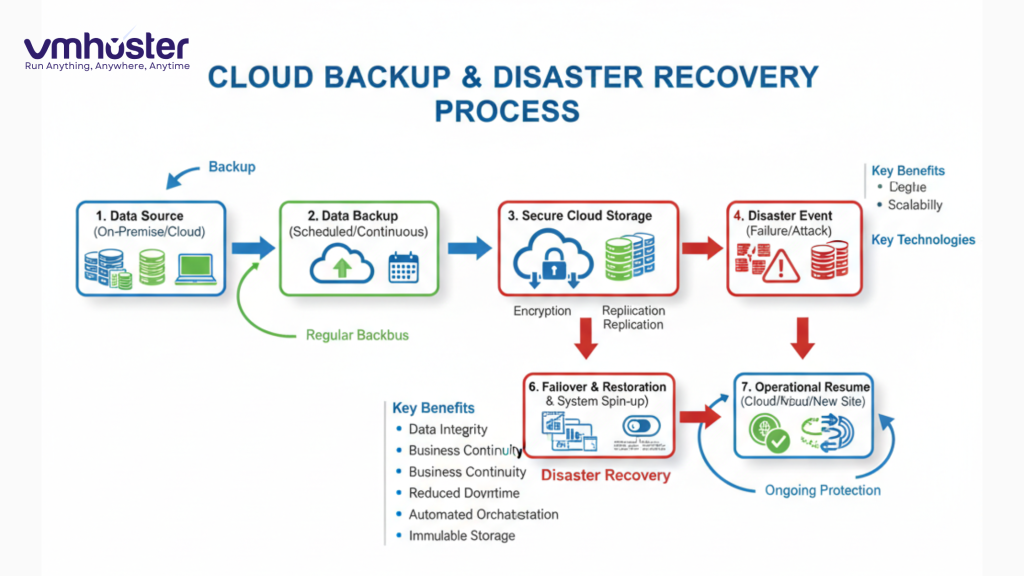
Traditional backup solutions are expensive and complex. Cloud computing includes built-in disaster recovery options that used to be available only to large enterprises.
Your data is typically replicated across multiple locations. If one data center goes down, your applications keep running from another location. I’ve seen companies recover from potential disasters in minutes rather than days.
The Disadvantages of Cloud Computing
Now, let’s be honest about the challenges. Cloud computing isn’t perfect, and pretending otherwise would be doing you a disservice.
1. Internet Dependency Is Real
This is probably the biggest catch. If your internet connection goes down, you’re essentially locked out of your own data and applications.
I experienced this firsthand during a regional internet outage last year. For three hours, our team couldn’t access critical files stored in the cloud. We’ve since implemented backup internet connections, but it’s an additional cost and complexity to consider.
2. Security and Privacy Concerns
Let me be clear: cloud providers invest millions in security—probably more than your organization could afford. However, you’re still trusting a third party with your sensitive data.
For industries like healthcare or finance with strict compliance requirements (HIPAA, GDPR, PCI-DSS), this becomes complicated. You need to carefully vet your provider’s security measures, encryption standards, and compliance certifications.
There’s also the question of data sovereignty—where is your data physically stored? This matters for legal and regulatory reasons. The Cloud Security Alliance offers excellent resources on cloud security best practices.
3. Limited Control and Customization
When you’re using cloud services, you’re playing by someone else’s rules. Need a specific configuration that the provider doesn’t support? You might be out of luck.
I’ve worked with developers frustrated by platform limitations that wouldn’t exist with on-premise infrastructure. Sometimes you need that level of control, especially for specialized applications or legacy systems.
4. Ongoing Costs Can Add Up
While cloud computing reduces upfront costs, the subscription model means you’re paying forever. Run the numbers carefully—for some workloads, especially stable, long-term ones, owning infrastructure might actually be cheaper over 5-7 years.
I’ve seen companies surprised by their cloud bills when they don’t properly manage their resources. Those “pay for what you use” advantages can turn into “death by a thousand small charges” if you’re not careful.
5. Vendor Lock-In Risk
Switching cloud providers isn’t like changing your email address. It’s complex, time-consuming, and potentially expensive.
Each provider has proprietary tools and services. Once you’ve built your infrastructure around AWS, Azure, or Google Cloud, migrating to another provider can feel like rebuilding from scratch. This gives providers significant leverage in pricing negotiations.
Making the Right Decision for Your Business
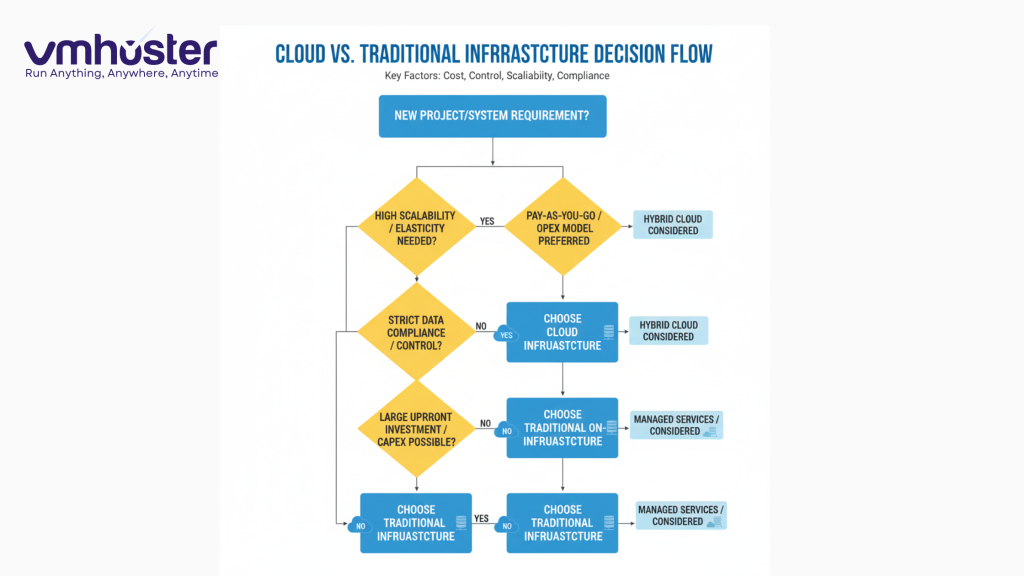
So, should you move to the cloud? The honest answer is: it depends.
Cloud computing works exceptionally well for:
- Startups and small businesses wanting to minimize upfront costs
- Companies with fluctuating resource demands
- Organizations with remote or distributed teams
- Businesses needing quick deployment and scalability
You might want to reconsider if:
- You have highly specialized compliance requirements
- Your internet connectivity is unreliable
- You’re running stable, predictable workloads for the long term
- You need complete control over your infrastructure
Many organizations are adopting a hybrid approach—keeping critical or sensitive workloads on-premise while moving other services to the cloud. This gives you the best of both worlds.
Final Thoughts
Cloud computing has fundamentally changed the IT landscape, and that’s not going to reverse. The advantages—cost efficiency, scalability, accessibility—are compelling for most businesses. But the disadvantages are real and shouldn’t be ignored.
My advice? Start small. Move a non-critical workload to the cloud and see how it works for your organization. Learn the platform, understand the costs, and then scale your adoption based on actual experience rather than marketing promises.
If you’re considering making the move to cloud hosting or need expert guidance on choosing the right solution, explore VMHoster’s cloud hosting services designed for businesses of all sizes.
The cloud isn’t a magic solution, but used wisely, it’s an incredibly powerful tool for modern businesses.
Related Resources:
- Understanding VPS Hosting vs Cloud Hosting
- National Institute of Standards and Technology (NIST) – Cloud Computing Standards
- AWS Well-Architected Framework – https://aws.amazon.com/architecture/well-architected/
Have you made the transition to cloud computing? Share your experiences in the comments below—I’d love to hear what worked (and what didn’t) for your organization.